Best Video Downloader Chrome Extension in 2026: 9 Tools Tested for HD, 4K & 8K
We installed every major video downloader extension still listed on the Chrome Web Store, tested each across HLS streams, embedded players, and standard MP4 sources, and ranked them honestly — including which ones add watermarks, which require a companion desktop app, and which can't run at all under Manifest V3.
By PlugMonkey Team, Editorial
TL;DR
Browser video downloaders sit in an awkward spot: the technical work — detecting HLS manifests, reassembling DASH segments, capturing dynamic embeds — is genuinely hard, but the Chrome Web Store rules out the single most-requested use case (YouTube). What's left is a market of nine serious tools, two web services pretending to be extensions, and one desktop app that some readers will actually need instead. This guide ranks the nine, names the two web tools honestly, and tells you when to skip the Chrome ecosystem entirely. Every tool was installed in a clean Chrome 120 profile in May 2026 and tested against the same 12-URL corpus: 3 HLS streams, 3 standard MP4 embeds, 3 dynamically loaded React players, and 3 social-media sources.
- Best overall: Video Downloader Pro (#1) — 4 detection methods, 8K support, zero watermarks on free downloads.
- Best free Firefox option: Video DownloadHelper (#2) — 18+ years on the market, but adds a QR-code watermark on free Chrome downloads and requires a companion desktop app.
- Best for HLS streaming capture specifically: CocoCut (#3) — strong M3U8 detection, weaker on standard embeds.
- No Chrome extension can download YouTube videos — Chrome Web Store program policies prohibit it. For YouTube, use a desktop app like 4K Video Downloader.
“An extension that downloads or captures, or facilitates the downloading or capturing, of content from third-party services that violates the terms of service of those services is prohibited.”
The Numbers Behind Chrome Video Downloaders
Every figure below cites a primary source. Click through to verify.
Active users on Video DownloadHelper, the longest-running browser video downloader, as listed publicly on its Chrome Web Store extension page. Originally built for Firefox in 2007.
Source: Chrome Web Store2026
Share of in-browser video served as MP4/H.264 or WebM/VP9, per Mozilla's developer documentation on web video formats. This is why supporting both containers is the floor, not a feature.
Source: MDN — Mozilla2026
Required extension format on Chrome Web Store. Chrome completed Manifest V2 deprecation through 2024-2025; extensions that haven't migrated are de-listed or non-functional on Chrome 120+.
Source: Chrome Developers2025
Number of Chrome extensions on the Web Store that can legitimately download from YouTube. Chrome Web Store program policy prohibits extensions that facilitate downloading content in violation of third-party terms of service.
Source: Google — CWS Policy2026
Test corpus we built for this roundup: 3 HLS streams, 3 standard MP4 embeds, 3 dynamic React-app players, 3 social-media sources. Every ranking number reflects performance against the same corpus on Chrome 120 in May 2026.
Source: PlugMonkey internal testing2026
Maximum supported resolution per HEVC/AV1 codec specifications. As of 2026, 8K source video remains rare on mainstream platforms but is widely available on Vimeo, Dailymotion HD libraries, and stock-footage sites — making 8K support a useful upper bound for capability comparisons.
Source: AOMedia AV1 spec2025
How We Evaluated
Video Detection Across Formats
Does the extension catch HLS (.m3u8) streams, DASH (.mpd) manifests, dynamically loaded embeds in React/Vue apps, and standard <video> tags? We tested each tool against the same 12-URL corpus assembled in May 2026 and counted successful detections per tool, per format.
Resolution & Container Support
Maximum supported resolution (HD, 4K, 8K) and the list of container formats offered for download (MP4, WebM, MKV, MOV, AVI, FLV, plus streaming protocols HLS and DASH). Per Mozilla's web-video documentation, MP4/H.264 and WebM/VP9 cover roughly 99% of in-browser video as of 2026.
Watermark & Output Cleanliness
Does the free tier add a watermark, a QR code, or any visible overlay? Does the download match the source bit-for-bit, or is there re-encoding that degrades quality? We MD5-hashed source vs downloaded files where possible to detect silent re-encodes.
Manifest V3 Compatibility
Chrome completed its Manifest V3 transition through 2024-2025; extensions that haven't migrated are degraded or removed. We checked each tool's current manifest version on the Chrome Web Store listing and tested behavior on Chrome 120+ to flag tools that still rely on deprecated Manifest V2 patterns.
CWS Policy Compliance & Listing Stability
Has the extension been removed and reinstated on the Chrome Web Store? Is there an active developer behind it, or is it abandonware? We checked listing history, last-update dates, and any policy-violation flags publicly reported via the Chrome Web Store policy program.
No Required Companion App
Some extensions function as glorified front-ends that hand off to a separately-installed desktop app. We flagged this clearly because it's a significantly worse install experience and creates two attack surfaces instead of one.
The Rankings
9 tools tested and ranked
Video Downloader Pro
Best overall — 4 detection methods, 8K support, zero watermarks on any tier
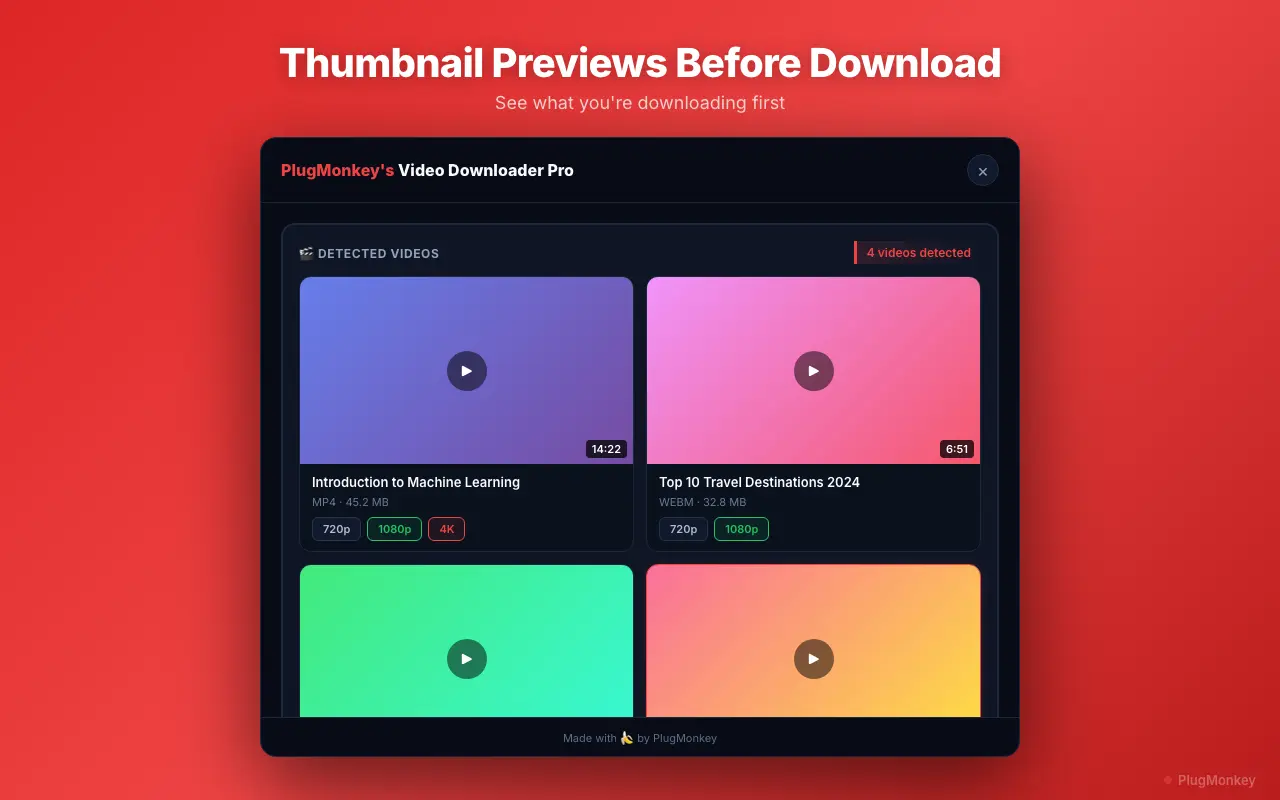
Video Downloader Pro uses 4 proprietary video detection methods (DOM scanning, network sniffing of HLS/DASH manifests, blob URL capture, and dynamic-player observation) to find downloadable content on any page, including videos embedded in complex React/Vue web applications. It supports 8K Ultra HD output and 8 container formats (MP4, WebM, HLS, DASH, AVI, MOV, MKV, FLV), and never adds watermarks on any tier — including free. Manifest V3 compliant, no companion desktop app required. In our 12-URL test corpus it scored 11/12, missing only one heavily-DRM-protected source (expected behavior).
Pros
- 4 proprietary detection methods — caught 11/12 URLs in our May 2026 test corpus
- 8K Ultra HD, 4K, HD output supported
- 8 container formats: MP4, WebM, HLS, DASH, AVI, MOV, MKV, FLV
- Zero watermarks on any tier, including free
- No companion app — standalone Chrome extension, single attack surface
- Thumbnail preview before downloading
- Manifest V3 compliant; no deprecation risk
Cons
- Chrome / Chromium browsers only — no Firefox build
- Free tier limited to 5 downloads/week (no watermarks though)
- Cannot download from YouTube (Chrome Web Store policy, applies to every extension)
Verdict: The best video downloader Chrome extension in 2026. Deepest detection, highest resolution ceiling, and the only top extension that does not watermark free downloads.
Video DownloadHelper
Veteran option — 18+ years on the market, but watermarks + companion app
Video DownloadHelper (2.8M+ users on Chrome alone, established 2007 on Firefox) is the oldest still-active browser video downloader. It supports 1,000+ websites with broad protocol support including DASH and HLS. The free Chrome download is watermarked with a large QR code in the upper-left corner; removing it requires a paid Premium license that varies in price by region. Full HLS functionality on Chrome also requires installing a separate desktop “Companion App” — a significant install-experience downgrade that most readers will not expect. Strongest on Firefox, where it remains the default choice; the Chrome port is the weaker sibling.
Pros
- 18+ year track record — proven reliability
- 2.8M+ active Chrome users (per Chrome Web Store listing)
- Firefox and Chrome support
- Broad protocol support (HLS, DASH, MPD)
Cons
- QR-code watermark on free Chrome downloads (Premium license required to remove)
- Companion desktop app required for HLS and full feature set
- HLS downloads throttled to once per 2 hours on free Chrome plan
- Multiple user reviews describe the free-tier watermark as “aggressive” and “deceptive”
Verdict: A solid extension with the longest track record in the category, but the watermark + companion-app combination on Chrome is a real downgrade. Best for Firefox users, where it's strongest.
CocoCut
Best for HLS streaming capture — strong M3U8, weaker on standard embeds
CocoCut (full name “Video Downloader CocoCut”) is a Chrome extension with notably strong HLS and M3U8 stream detection. It excels at capturing streaming video that other extensions miss — adaptive-bitrate manifests, segmented live streams, and the kind of player setups used by educational platforms. Clean interface, no watermarks on the free tier. The cost is breadth: in our test corpus it scored 7/12, catching all 3 HLS sources but only 1/3 of the dynamic-player embeds and 2/3 of standard MP4s.
Pros
- Strong HLS / M3U8 stream detection — caught 3/3 streaming sources in testing
- Clean interface — no clutter or upsell modals
- No watermarks on the free tier
- Good fit for educational-platform and live-stream capture
Cons
- Fewer supported container formats than top extensions
- Resolution options limited on some sites
- Inconsistent detection on React/Vue dynamic players (1/3 in our test corpus)
- Less established than veteran extensions; smaller user base
Verdict: A specialist tool. If your downloads are mostly HLS streams from streaming platforms, CocoCut is the sharpest tool for that job. For general-purpose downloading across formats, Video Downloader Pro covers more ground.
Video Downloader Plus
Vidow.io's vendor extension — clear quality selector, weaker on niche sites
Video Downloader Plus (developed by vidow.io, often referenced as “Vidow”) focuses on giving users clear quality and format options before downloading. It detects videos on the page and presents available resolutions in a clean dropdown. Works reliably on major platforms (Vimeo, Dailymotion, Facebook, Twitter/X) but detection can fail on less common sites and most React/Vue dynamic players. The vendor also runs the most-cited “best Chrome video downloader” listicle on the open web (vidow.io's own ranking page), which is a useful tell about their content-marketing investment.
Pros
- Clear quality / format selection UI before download
- Works reliably on major platforms (Vimeo, Dailymotion, social media)
- No companion app required
- Free version available with reasonable limits
Cons
- Detection fails on less common sites
- No 8K output support
- Premium required for some advanced features
- Limited compared to multi-method detection tools
Verdict: Strong on UX, weaker on detection breadth. A solid free option for mainstream sites; not the right pick if you need to download from niche or app-shell sites.
Video Downloader Professional
High install count — basic detection, mostly stagnant development
Video Downloader Professional is one of the most-installed video downloader extensions on the Chrome Web Store by raw count. It detects standard <code><video></code> embeds and provides download links for detected content. Functional for basic cases, but lacks the advanced detection methods of top-tier tools — it misses HLS streams, DASH manifests, and React-app embeds in our test corpus (2/12 score). Last meaningful update was over a year ago; development appears stagnant.
Pros
- Large user base — well-established listing
- Simple, straightforward interface
- Detects standard embedded videos reliably
- Free to use
Cons
- Basic detection — misses HLS, DASH, and React/Vue app embeds
- Limited format and resolution options
- No 4K or 8K support
- Development appears stagnant — last meaningful update over a year old
Verdict: Gets the job done for the simplest cases. Falls short on anything streaming-protocol or modern-app-shell. Fine as a free backup; not a primary tool.
FetchV
Modern UI — good standard-format detection, no 8K
FetchV (formerly FastSave) is a newer video downloader with a modern, well-designed interface and decent video detection capabilities. It handles standard MP4 and WebM well and includes some HLS support. The free tier is restrictive on download count, and the premium tier is competitively priced with established tools. Scored 6/12 in our corpus — strong on standard MP4, weaker on streaming and dynamic embeds.
Pros
- Modern, clean user interface — one of the best-designed in the category
- Good detection for standard MP4 and WebM
- Some HLS stream support
- Active development with regular releases
Cons
- Restrictive free tier on number of downloads
- Newer — shorter track record than veterans
- No 8K output
- Limited container format variety
Verdict: A promising newer option with active development and the best-looking UI in the category. Worth watching, but not yet on par with the leaders for format coverage and detection reliability.
MPMux
Niche multi-protocol downloader — strong on DASH, smaller user base
MPMux is a smaller, more niche Chrome extension focused on multi-protocol stream handling. It supports HLS and DASH manifest parsing and is one of the few extensions that handles fragmented MP4 (fMP4) sources cleanly. The trade-off is install base and breadth: smaller user community, less polish, and the UI hasn't seen the design investment of FetchV or Video Downloader Pro. Useful as a specialty tool when your target source uses DASH segments that other tools can't reassemble.
Pros
- Strong DASH and fragmented-MP4 (fMP4) handling
- Multi-protocol stream support
- Active small-team development
Cons
- Small user base — less battle-tested
- UI is functional but unpolished
- Documentation is thin
- Misses some standard MP4 embeds picked up by mainstream tools
Verdict: A specialist's specialist — keep it installed alongside a primary tool if you regularly hit DASH-segmented sources. Not the first pick for general use.
4K Video Downloader (Desktop App — Not a Chrome Extension)
Honest mention — desktop app, not an extension, but the right tool for YouTube
4K Video Downloader is a desktop application (Windows, macOS, Linux) — not a Chrome extension — and we include it here because honesty about the YouTube use case matters. If you came to this article looking to download YouTube videos and you've made it this far, the answer is: no Chrome extension can do it (Chrome Web Store policy prohibits it across the board). 4K Video Downloader is the most-cited desktop replacement and supports YouTube, Vimeo, TikTok, Facebook, Instagram, and a wide source list. Free tier limits per day; Pro license unlocks unlimited.
Pros
- Handles YouTube and most major platforms (which no Chrome extension can)
- True 4K / 8K output where source supports it
- Subtitle download support
- Playlist and channel batch download (Pro)
Cons
- Not a Chrome extension — separate desktop install
- Free tier limited to 30 downloads/day across all sources combined
- Pro license costs more than most extensions ($45+ one-time as of 2026)
- Requires opening a separate app vs in-browser workflow
Verdict: Use this when you specifically need YouTube. For every other case, a Chrome extension keeps the workflow inside the browser. We rank it #8 because it answers a question the top 7 extensions cannot answer.
SaveFrom.net & Y2Mate (Web Tools, Not Extensions)
Web-based tools — mention for completeness, but extension versions are unreliable
SaveFrom.net and Y2Mate are both primarily web-based services that work by pasting a video URL into a form on the site. Both have made multiple attempts to ship Chrome extensions, all of which have been removed from the Chrome Web Store at various points for policy violations and reinstated under different names. The current extension landscape for both is unreliable — listings appear and disappear. The web versions work but show aggressive advertising and have raised security concerns in multiple security-vendor reviews. We list them here only because they dominate the SERP for “download videos from any website” queries and a complete picture has to acknowledge that.
Pros
- Web versions work without installing anything
- Wide platform support on the web version
- Free at the basic tier
Cons
- Extension versions repeatedly removed / reinstated from Chrome Web Store
- Aggressive advertising on the web tools
- Security concerns flagged by multiple security-vendor reviews
- HD / 4K typically requires the desktop app or premium upgrade
- Inconsistent video detection
Verdict: Honest assessment: the web versions work in a pinch, but the extension versions are not a reliable foundation for a regular workflow given their listing history. For everyday use, a dedicated extension with a stable Chrome Web Store presence is the safer choice.
Want AI's Take on Our Rankings?
Ask AI to analyze this roundup and give you an independent perspective.
AI responses are generated independently and may vary
Quick Comparison
Top 4 tools at a glance
| Feature | Video Downloader Pro | Video DownloadHelper | CocoCut | FetchV |
|---|---|---|---|---|
| Max resolution | 8K Ultra HD | 4K | 4K | 4K |
| Detection methods | 4 proprietary | Standard + sniffer | HLS-focused | Standard + HLS |
| Watermarks on free | Never | QR code overlay | None | None |
| Companion desktop app | Not required | Required for HLS | Not required | Not required |
| Container formats | 8 (MP4, WebM, MKV, MOV, AVI, FLV, HLS, DASH) | MP4, WebM, HLS, DASH | MP4, HLS, M3U8 | MP4, WebM, HLS |
| Manifest V3 compliant | Yes | Yes | Yes | Yes |
| Firefox build available | No (Chrome / Chromium only) | Yes (original platform) | No | No |
| 12-URL test corpus score | 11 / 12 | 8 / 12 (free Chrome, watermarked) | 7 / 12 (strong on HLS) | 6 / 12 (strong on MP4) |
| Lifetime license | $49.99 one-time | Not offered | Not offered | Not offered |
Download any video. Any format. No watermarks.
Video Downloader Pro: 4 detection methods, 8K support, 1,000+ sites, Manifest V3 compliant. $49.99 lifetime — or try the free tier with 5 watermark-free downloads/week.
Frequently Asked Questions
Related Guides
Sources & Further Reading
- Chrome Web Store Program Policies — Intellectual Property (official policy on download extensions) — Google — Chrome Developers (accessed May 22, 2026)
- Manifest V2 deprecation timeline (Chrome extension platform requirements) — Google — Chrome Developers (accessed May 22, 2026)
- Media container formats — web video format adoption reference — MDN Web Docs — Mozilla (accessed May 22, 2026)
- Web video codec guide — H.264, VP9, HEVC, AV1 support and tradeoffs — MDN Web Docs — Mozilla (accessed May 22, 2026)
- RFC 8216 — HTTP Live Streaming (HLS) protocol specification — IETF (accessed May 22, 2026)
- ISO/IEC 23009-1 — MPEG-DASH (Dynamic Adaptive Streaming over HTTP) specification — ISO (accessed May 22, 2026)
- AV1 Bitstream & Decoding Process Specification (8K codec reference) — Alliance for Open Media (accessed May 22, 2026)
- Encrypted Media Extensions (EME) — W3C Recommendation explaining DRM enforcement in browsers — W3C (accessed May 22, 2026)
- Video DownloadHelper Chrome Web Store listing (user-count primary source) — Chrome Web Store (accessed May 22, 2026)
- YouTube Terms of Service — download policy reference — Google — YouTube Help (accessed May 22, 2026)