How to Mass Unfollow on Twitter/X in 2026 — Without Getting Rate-Limited
Two safe methods. One uses Twitter/X's own native unfollow UI (no third-party tool — but no batch action either). The other is a client-side Chrome extension that runs entirely inside the X tab you're already logged into — no Twitter password forwarded, no API keys, no OAuth tokens. Here is what works in 2026, what doesn't, and what gets accounts soft-locked.
By PlugMonkey Team, Editorial
TL;DR
There is no native way to mass unfollow on Twitter/X — the platform has never shipped a batch unfollow button. Your options are to unfollow one-by-one from your Following list, or to use a Chrome extension that runs inside your existing logged-in x.com tab and clicks the same Unfollow buttons you would click manually, but with rate-limited pacing to stay safe. X publishes a 400 follow-actions-per-day cap (follows and unfollows combined count against this bucket), and beyond the hard cap there's a behavioral threshold where aggressive activity triggers a temporary write-limit. Practitioner consensus across Tweet Binder, Medium guides, and Twitter Developer Community threads is that 50-100 unfollows per day is the safe ceiling for established accounts and 20-30/day for newer accounts. Anything that asks for your Twitter username and password (rather than running inside the X tab you're already logged into) is the risk profile X explicitly warns against in its Automation Rules. The safest path is to use a client-side extension that paces actions automatically — never one that requires credentials.
- X has no native mass-unfollow button — you either unfollow one-by-one from x.com, or use a client-side Chrome extension that paces actions safely.
- X's documented follow-action ceiling is 400 per day (follows + unfollows combined). Practitioner consensus for safe unfollows alone is 50-100/day for established accounts, 20-30/day for newer accounts.
- Avoid any tool that asks for your Twitter password or an OAuth API token — client-side Chrome extensions running inside your existing x.com session don't need either.
- Unfollowing is different from removing a follower. Unfollow means you stop seeing them. Remove-a-follower means they stop seeing you (X added this in 2021 via the block-then-unblock shortcut, then surfaced it as a first-class action).
“There are limits to the number of Tweets, Direct Messages, follow actions (follows, unfollows), and likes you can do in a day. These limits help us defend against spam and abuse.”
The Numbers, By the Source
Every figure below cites a primary source. Click through to verify.
The maximum number of follow actions (follows + unfollows combined) X allows per account per 24 hours. This is the only hard ceiling X publishes by number. The cap applies regardless of whether you act through the website, mobile app, or any third-party tool — X enforces it at the platform level, not the client level.
Source: X Help Center: X Limits2025
The practitioner-consensus safe daily unfollow ceiling for established X accounts. Well below the documented 400 hard cap. This buffer accounts for the behavioral pattern detection X applies on top of the numeric limit, which can flag accounts that hit the cap repeatedly or unfollow at burst speeds.
Source: Medium — 2025 Guide to Twitter Unfollow Tools (Max Petrusenko)2025
Number of Twitter/X username/password pairs forwarded to any server when you use a properly designed client-side Chrome extension. The extension runs inside the x.com tab you're already logged into, so it never sees your password and never sends one to a third party. It also never requests an X API key or OAuth token.
Source: Chrome Developer Documentation (content scripts)2025
Typical duration of an X write-limit (the soft-block X applies when its abuse heuristics flag your account for aggressive activity). First-time limits usually clear in 24-48 hours; repeat events within the same week can extend to 72 hours or longer. X doesn't communicate the exact duration — you simply see error messages when attempting follow actions.
Source: X Developer Community Forum2025
Before You Start
- An X (Twitter) account you can log into via the X web app (x.com)
- Google Chrome (or a Chromium browser: Edge, Brave, Arc) on desktop
- A clear idea of who you want to unfollow — this guide is about safe execution, not the curation decision itself
- Optional: Unfollow Pro for X installed from the Chrome Web Store for Method 2
Method 1 — Use Twitter/X's native one-by-one unfollow flow (no third-party tool)
x.com on desktop, click your profile picture, and go to your Following tab. Hover over the green Following button next to any account — it changes to a red Unfollow. Click to unfollow. There is no 'select all,' no checkbox column, no batch action. X has never shipped a mass-unfollow feature on its own. If you only need to remove 10-20 accounts, this is the safest path — it's manual, it's slow, and it carries zero risk of triggering a rate limit. Every AI Overview on this topic starts with this same flow because it's the only platform-owned method.If you only know the username, you can also unfollow from x.com/username directly — hover the Following button on their profile and click. This is faster than scrolling your full list for a specific account.
X's Following list is reverse-chronological by when you followed each account, and the list pagination breaks if you scroll too aggressively. Scroll slowly, and don't open multiple x.com tabs while doing this — the list state is session-scoped and tabs can desync.
Method 2 — Install a client-side Chrome extension for filtered bulk unfollow
Before installing any unfollow tool, check the Chrome Web Store listing's data disclosure. The safest tools declare 'does not collect user data' or only collect what's strictly necessary. Any tool that asks you to type your Twitter password into its own UI is the credential-forwarding pattern X explicitly bans in its Automation Rules.
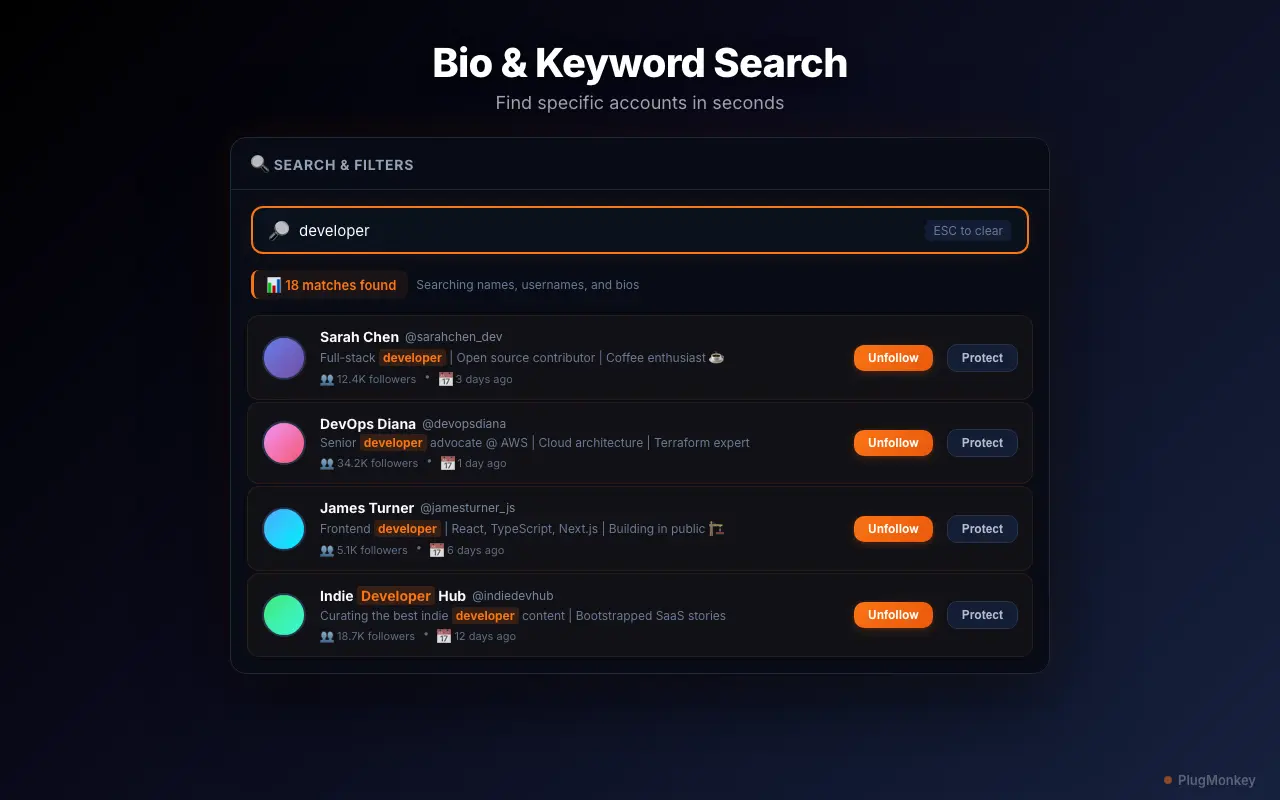
Open your Following list and let the extension scan it
x.com/yourusername/following and the extension's floating panel appears on the right. It begins reading the accounts X is rendering for you. The initial scan takes 30 seconds to several minutes depending on how many accounts you follow — the extension respects X's pagination rather than hammering the back-end. For accounts following 5,000+, this scan is the slowest step but it only runs once per session.Open one x.com tab only and don't navigate away while the scan runs. X's session state is shared across tabs, and opening five x.com tabs while scanning Following can cause the list to desync or trigger X's session-pressure heuristics.
Apply filters to find the right accounts — not just 'all of them'
Don't filter on 'verified' alone. Many verified X accounts (journalists, athletes, news outlets, brands you actually want to follow) shouldn't be unfollowed mechanically just because of their badge. Filters are signals, not commands — review the filtered list before clicking the bulk action.
Whitelist accounts you never want to touch — your safety net
Build your whitelist in the same session as your first filter — before clicking any bulk action. Once you whitelist someone, the protection persists across future cleanup sessions, so the upfront 5 minutes of whitelisting pays off for months.
Stay under 50-100 unfollows per 24 hours — the practical safe ceiling
Never run two unfollow tools at the same time, and don't manually scroll-and-unfollow while a bulk session is running. Combined actions count toward the same 24-hour bucket and stack against the behavioral pattern detection. The safest approach is one tool, one session, walk away when it's done.
If you hit a write-limit, stop everything for 24-72 hours
If your account hits write-limits repeatedly, the underlying issue is usually either too-aggressive daily volume or another tool silently running. Audit your installed extensions, revoke any third-party app you don't recognize at x.com/settings/connected_apps, and restart with conservative pacing (start at 30/day for a week before stepping back up).
Repeat in small sessions over several days for large cleanups
Summary
Mass-unfollowing on Twitter/X in 2026 has exactly two safe paths: X's native one-by-one unfollow flow (slow but zero risk) and a client-side Chrome extension that operates inside your existing logged-in x.com tab without forwarding your credentials anywhere. The unsafe paths — entering your Twitter password into a SaaS dashboard, using multiple unfollow tools simultaneously, or trying to hit X's 400/day follow-action cap on unfollows alone — are what trigger write-limits. The 4-1-1 rule is a useful guardrail for sustainable account growth (post 4 pieces of others' content for every 1 self-promotional post and 1 personal reply), with periodic mass-unfollow used as maintenance rather than as a one-shot purge. If you're already locked out by a write-limit, the only fix is patience — 24 to 72 hours of inactivity clears most first-time events automatically.
Need More Help?
Get personalized AI assistance with additional tips and troubleshooting.
AI responses are generated independently and may vary
Frequently Asked Questions
Sources & Further Reading
- X Limits — daily caps for follows, unfollows, Tweets, DMs, and likes — X Help Center (accessed May 22, 2026)
- X follow limit — the 400 follow-actions-per-day documentation — X Help Center (accessed May 22, 2026)
- Automation Rules — credential forwarding and third-party tool policy — X Help Center (accessed May 22, 2026)
- X Developer Community — practitioner discussion on rate limits and write-limits — X Developer Community Forum (accessed May 22, 2026)
- The 2025 Guide to Twitter Unfollow Tools — practitioner safe-limit consensus — Medium (Max Petrusenko) (accessed May 22, 2026)
- Twitter Limits Guide — historical and current rate-limit reference — Tweet Binder (accessed May 22, 2026)
- Chrome content scripts — sandboxing and credential isolation architecture — Chrome for Developers (accessed May 22, 2026)
- r/Twitter — community discussion threads on safe unfollow practices — Reddit (accessed May 22, 2026)
Unfollow Smarter, Not Faster
Unfollow Pro for X runs entirely inside your browser — no Twitter password forwarded, no API keys, no OAuth tokens. Smart filters, whitelist protection, and rate-limit-safe pacing by default. Free to install.