How to Mass Unfollow on Instagram in 2026 — Without Getting Action-Blocked
Two safe methods. One is Instagram's own built-in Least Interacted With filter (50 accounts per page, no extra tools). The other is a client-side Chrome extension that runs entirely in your browser — no Instagram login forwarded to any server, no API keys, no third-party access tokens. Here is what works, what doesn't, and what gets accounts banned.
By PlugMonkey Team, Editorial
TL;DR
There is no way to unfollow everyone on Instagram with a single click. Instagram caps native bulk-unfollow at 50 accounts per page (the Least Interacted With filter, accessed inside the mobile app under Following → Categories). Beyond that, your options are to repeat that flow each session, or to use a Chrome extension that runs entirely in your own browser and paces unfollow actions to stay under Instagram's daily action-block threshold of around 150-200 unfollows per 24 hours. Instagram does not publish exact rate limits, but Instagram Head Adam Mosseri has confirmed in his 2024 AMA Reel that the platform actively rate-limits mass actions to protect against spam. Anything that asks for your Instagram password (rather than running inside the Instagram tab you're already logged into) is the risk profile Instagram explicitly warns about. The safest path is to combine both methods: use Instagram's native Least Interacted With for the first 50, then use a client-side extension for everything beyond.
- Instagram's native Least Interacted With filter unfollows up to 50 accounts per page — start there, it requires no third-party tool.
- Safe daily ceiling is 150-200 unfollows per 24 hours for established accounts; newer accounts should stay under 100/day.
- Avoid any tool that asks for your Instagram username and password — client-side Chrome extensions that work inside your existing logged-in session don't forward credentials anywhere.
- There is no single-click way to unfollow everyone; spread large cleanups over 3-5 days to avoid action blocks.
“We rate-limit a lot of things on Instagram so that people can't spam other people. So if you're trying to do something a lot, really quickly, you might run into a limit.”
The Numbers, By the Source
Every figure below cites a primary source. Click through to verify.
The conservative safe daily unfollow ceiling for established Instagram accounts. Instagram does not publish hard numbers, but this range is the consensus across Hootsuite, Buffer, and SocialPilot guidance and matches the threshold third-party tools self-impose to avoid triggering action blocks.
Source: Hootsuite / Buffer (industry consensus)2025
Maximum number of accounts you can unfollow in a single batch using Instagram's native Least Interacted With filter inside the mobile app. To unfollow more, you must scroll, refresh, and repeat the flow — Instagram intentionally throttles this UI.
Source: Instagram Help Center (Following Categories)2025
Typical duration of an Instagram action block when triggered by mass unfollowing. Severe or repeat blocks can extend to two weeks. Instagram does not communicate the exact duration in advance — you simply see a 'Try Again Later' modal until the cooldown ends.
Source: Instagram Help Center: action blocks2025
Number of Instagram username/password pairs forwarded to any server when you use a properly designed client-side Chrome extension. The extension runs inside the Instagram tab you're already logged into, so it never sees your password and never sends one to a third party.
Source: Chrome Developer Documentation (content scripts)2025
Before You Start
- An Instagram account you can log into via the Instagram web app (instagram.com)
- Google Chrome (or a Chromium browser: Edge, Brave, Arc) on desktop
- A clear sense of who you want to unfollow — this guide is about safe execution, not about who to keep
- Optional: Unfollow Pro for Instagram installed from the Chrome Web Store for Method 2
Method 1 — Use Instagram's native Least Interacted With filter (no third-party tool)
Combine 'Least Interacted With' with 'Most Shown in Feed' to get two complementary lists. Together they cover most cleanup scenarios — the first surfaces dormant follows, the second surfaces high-volume posters who may be drowning out your feed.
The Least Interacted With list is only available in the Instagram mobile app — not on instagram.com web. If you only ever use Instagram on desktop, you must either install the mobile app temporarily or use Method 2 below.
Method 2 — Install a client-side Chrome extension for unlimited bulk unfollow
Before installing any unfollow tool, check that its Chrome Web Store listing says it 'does not collect user data' or only collects what's strictly necessary. Avoid any tool that requires you to type your Instagram password into its own UI — that's the credential-forwarding risk profile Instagram explicitly warns about in its Community Guidelines.
Open your Following list and let the extension scan it
instagram.com/yourusername and click your Following count. The extension's floating panel appears on the right of the screen and begins reading the accounts Instagram is showing you. Loading the full list takes 30 seconds to several minutes depending on how many accounts you follow — the extension respects Instagram's pagination rather than hammering the API. For accounts that follow 5,000+, this initial scan is the slowest step.Open one tab only and don't browse elsewhere while the scan runs. Instagram's rate limits are global to your session, so opening five Instagram tabs while scanning Following ironically increases your chance of hitting a soft limit.
Apply filters to find the right accounts (not just 'all of them')
Don't filter on 'verified' alone. Many verified accounts (athletes, news outlets, brands you actually want to follow) shouldn't be unfollowed mechanically just because they're verified. Filters are signals, not commands.
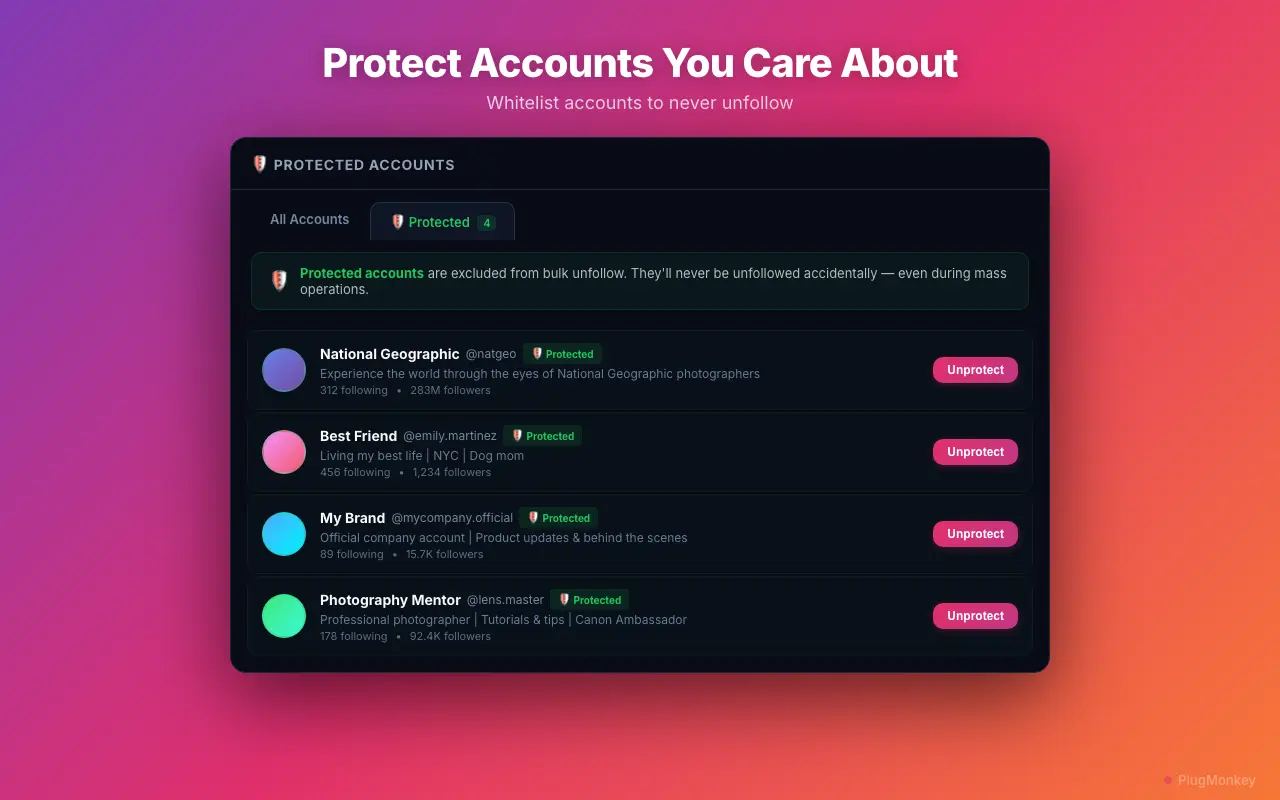
Whitelist accounts you never want to touch — your safety net
Build your whitelist in the same session as your first filter — before clicking any bulk action. Once you whitelist someone, it persists for every future cleanup session, so the upfront 5 minutes of whitelisting pays off for months.
Stay under 150-200 unfollows per 24 hours — the action-block threshold
Never run two unfollow tools at the same time. Combined actions count toward the same hourly bucket and will trigger an action block fast. Likewise, don't manually scroll-and-tap-unfollow while a bulk session is running.
If you hit an action block, stop everything for 24-48 hours
If your account hits action blocks repeatedly, the underlying issue is usually that you're either too aggressive with daily volume or that another tool is silently running. Audit your installed extensions, revoke any third-party app you don't recognize at instagram.com/accounts/manage_access, and restart with conservative pacing.
Repeat in small sessions over several days for large cleanups
Summary
Mass-unfollowing on Instagram in 2026 has exactly two safe paths: Instagram's native Least Interacted With filter (capped at 50 accounts per session, mobile-only, no third-party tools) and a client-side Chrome extension that operates inside your existing logged-in Instagram tab without forwarding your credentials anywhere. The unsafe paths — entering your password into a SaaS dashboard, using multiple unfollow tools simultaneously, or attempting more than 150-200 unfollows in 24 hours — are what trigger action blocks. The 5-3-1 social-engagement rule is a useful guardrail: follow 5, engage with 3, post 1 piece of original content per day, with mass-unfollow used as periodic maintenance rather than a one-time purge. If you're already locked out by an action block, the only fix is patience — 24 to 48 hours of inactivity will clear most first-time blocks automatically.
Need More Help?
Get personalized AI assistance with additional tips and troubleshooting.
AI responses are generated independently and may vary
Frequently Asked Questions
Sources & Further Reading
- Action blocks on Instagram — Help Center — Instagram Help Center (accessed May 22, 2026)
- Following Categories: Least Interacted With and Most Shown in Feed — Instagram Help Center (accessed May 22, 2026)
- Instagram Community Guidelines FAQs (third-party app policy) — Instagram (Meta) (accessed May 22, 2026)
- How to Unfollow on Instagram in 2025 (rate limits + safe pacing) — Hootsuite Blog (accessed May 22, 2026)
- How to Unfollow on Instagram — Buffer's guide to safe pacing — Buffer (accessed May 22, 2026)
- Chrome content scripts — sandboxing and credential isolation — Chrome for Developers (accessed May 22, 2026)
- r/InstagramMarketing community thread on safe mass-unfollow practices — Reddit (accessed May 22, 2026)
- How to Unfollow People on Instagram — SocialPilot — SocialPilot (accessed May 22, 2026)
Unfollow Smarter, Not Faster
Unfollow Pro for Instagram runs entirely inside your browser — no Instagram password forwarded, no API keys, no third-party access tokens. Free to install, rate-limit-safe by default.