How to Build a Research Library with ReadMonkey Pro in 2026
Turn ReadMonkey Pro into a complete research tool. Collect web articles, develop a tagging taxonomy, annotate in a distraction-free reader, and export your findings to Obsidian, Notion, or any knowledge base.
Before You Start
- Google Chrome browser (desktop)
- ReadMonkey Pro installed from the Chrome Web Store
- A research topic or project to organize around
Install and set up ReadMonkey Pro
Develop a tagging taxonomy for your research
Start with 8-12 tags and expand as needed. Too many tags from the start leads to inconsistency. Write your taxonomy down (even in a sticky note) and refer to it until tagging becomes second nature. Consistent tagging is more important than exhaustive tagging.
Save articles as you research
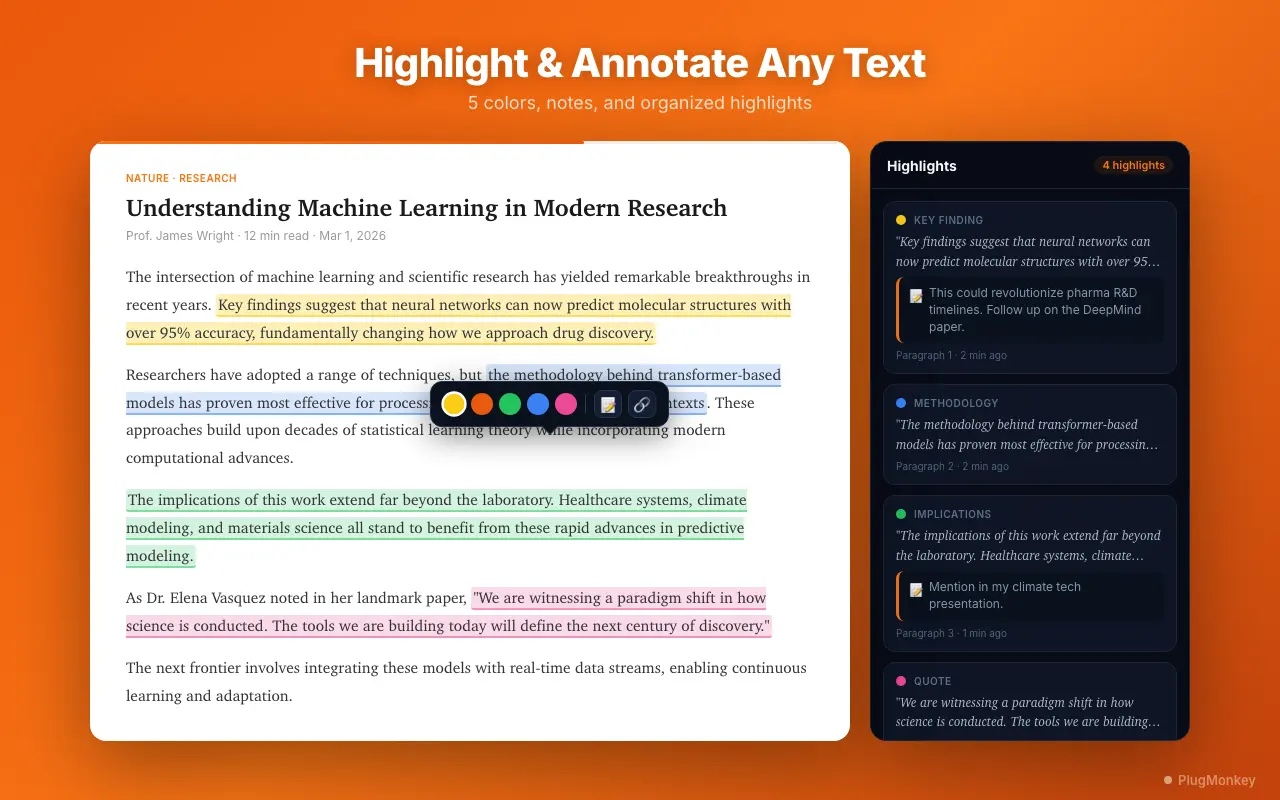
Read and annotate in distraction-free mode
Read in focused batches rather than one article at a time. Open 3-5 related articles, read them sequentially, and annotate connections between them. This comparative reading reveals patterns and contradictions that single-article reading misses.
Use search to find across your library
Export annotated articles to your knowledge base
For academic research, export to Markdown and organize by topic in your Obsidian vault. Create a literature review note that links to individual article exports using [[wiki links]]. This creates a navigable web of your research that grows with your reading.
Maintain your library over time
Create a "to-review" tag for articles you have saved but not yet read deeply. During your monthly maintenance session, prioritize these articles. If something has sat in "to-review" for more than a month, honestly evaluate whether you need it — if not, remove it to keep your library lean.
Summary
You have built a complete research workflow using ReadMonkey Pro as your article collection, annotation, and export tool. Starting with a deliberate tagging taxonomy gives your library structure from day one. One-click saving captures sources as you discover them, while the distraction-free reader with color-coded highlights and inline notes transforms reading into active knowledge capture. Full-text search (Pro) lets you find specific information across hundreds of articles instantly. Multi-format export — Markdown for Obsidian and Notion, CSV for spreadsheets, HTML for archives — ensures your research lives beyond the browser. Regular maintenance keeps your library focused and your tags consistent. Over time, this workflow creates a searchable, annotated archive of everything you have read for your research, accessible in the tools where you do your real analytical work.
Need More Help?
Get personalized AI assistance with additional tips and troubleshooting.
AI responses are generated independently and may vary
Frequently Asked Questions
Build Your Personal Research Library
ReadMonkey Pro collects, annotates, and exports web articles for your research workflow. Unlimited saves, 5 highlight colors, and multi-format export. Free to install.