FAQ
What Video Formats and Resolutions Does Video Downloader Pro Support?
Quick Answer
Video Downloader Pro detects and downloads MP4 (H.264), WebM (VP8/VP9), HLS streams (.m3u8), and DASH adaptive streams (.mpd) at the resolutions the source site serves — from 360p up to 4K (2160p). The extension does not upscale, downscale, or bypass DRM. Adaptive HLS/DASH streams are assembled into a single playable file on download. Audio-only and video-only streams are also detectable when sites serve them separately.
- Supported formats: MP4 (H.264), WebM (VP8/VP9), HLS streaming (.m3u8), DASH adaptive streams (.mpd).
- Resolutions: 360p, 480p, 720p, 1080p, 1440p, 2160p (4K) — whatever the source site serves. The extension does not upscale or downscale.
- Adaptive HLS/DASH streams are detected and assembled into a single playable file on download. Audio-only and video-only streams are detectable when served separately.
- DRM-protected content (Widevine, PlayReady) cannot be saved as playable video files. The extension complies with platform DRM by design.
By PlugMonkey Team, Editorial
Supported Video Formats
Video Downloader Pro detects all major web video formats used by modern websites. The specific formats available on any given page depend on what the website serves — the extension captures whatever the site provides.
- MP4 (H.264) — The most common web video format. Plays everywhere — computers, phones, tablets, smart TVs. This is what you will see most often.
- WebM (VP8/VP9) — Google's open video format, commonly used by web-first platforms. Excellent quality-to-size ratio. Supported by all modern browsers and most video players.
- HLS (HTTP Live Streaming) — Adaptive streaming format used by many professional video platforms. The extension captures the stream and downloads it as a playable video file.
- DASH (Dynamic Adaptive Streaming) — Another adaptive streaming protocol used by high-traffic video platforms. Video Downloader Pro handles DASH streams and provides downloadable files.
- M3U8 streams — The playlist format used by HLS. When detected, the extension resolves the playlist and downloads the video content at your selected quality level.
Available Resolutions
The resolution options shown in the extension depend on what the source website makes available. Video Downloader Pro does not upscale or downscale — it shows you the actual quality levels served by the site. Common resolution options include:
- 4K (2160p) — Available on sites that serve ultra-high-definition content. Largest file sizes.
- 1080p (Full HD) — The most common high-quality option. Good balance of quality and file size.
- 720p (HD) — Standard HD. Suitable for most viewing purposes with smaller files.
- 480p (SD) — Standard definition. Smallest file sizes, adequate for mobile viewing or when bandwidth is limited.
- 360p and below — Lower resolutions sometimes available as additional options. Useful for preview or bandwidth-constrained situations.
How Format Detection Works
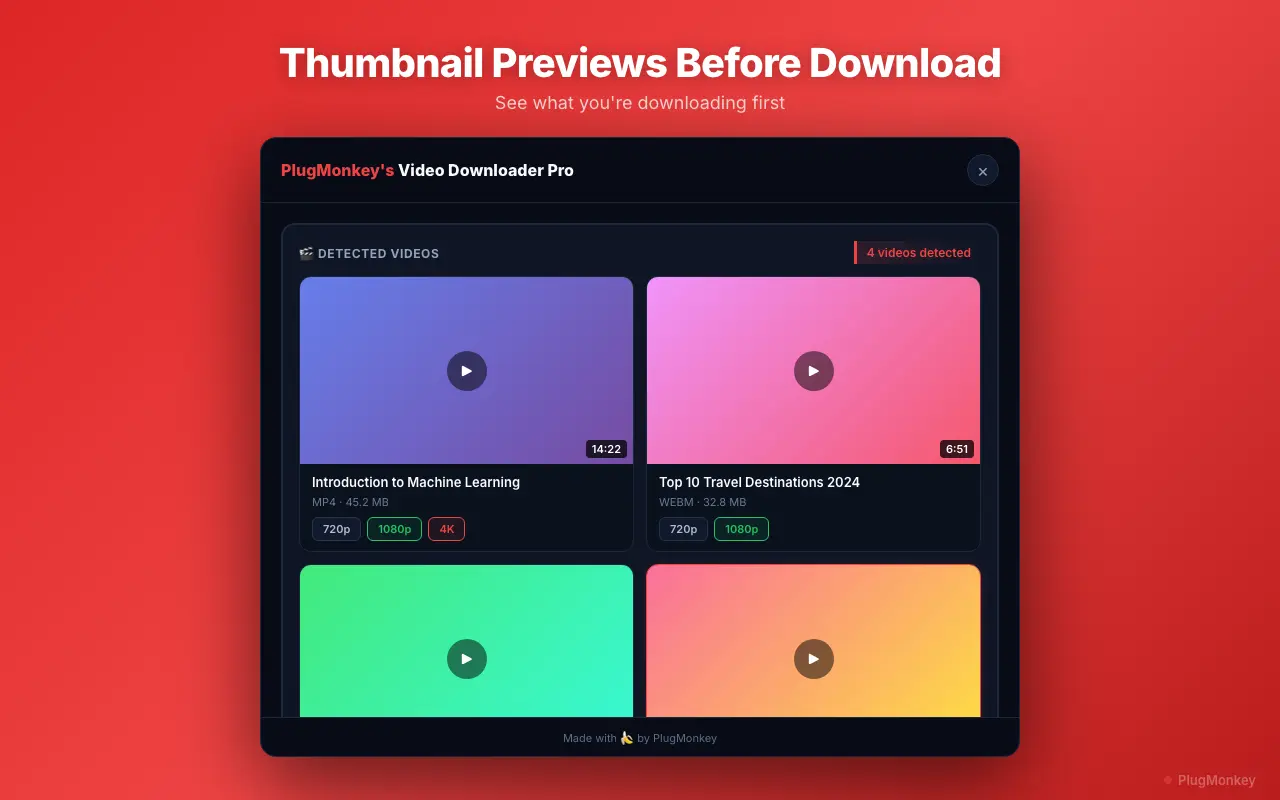
When you visit a webpage with video content, Video Downloader Pro runs in the background monitoring network requests. It identifies video streams by analyzing the content type and URL patterns of resources loaded by the page. When a video stream is detected, the extension icon in your toolbar lights up with a numbered badge indicating how many videos were found. Click the icon to see a list of all detected videos with their format, resolution, and estimated file size.
Choosing the Right Format
When multiple formats are available for the same video, here is how to decide which one to download.
- For maximum compatibility — Choose MP4. It plays on virtually every device and application without any codec issues.
- For best quality at smaller file size — Choose WebM (VP9) when available. It offers better compression than H.264 MP4 at the same visual quality.
- For editing or professional use — Choose the highest resolution MP4 available. Most video editing software handles MP4/H.264 natively.
- For quick sharing — Choose 720p MP4 for a good balance of quality and file size that uploads quickly.
Handling Streaming Protocols (HLS and DASH)
Many modern video platforms use adaptive streaming protocols (HLS or DASH) instead of serving a single video file. These protocols break the video into small chunks and adjust quality in real time based on your internet speed. Video Downloader Pro handles this transparently: when it detects an HLS or DASH stream, it presents the available quality levels as download options. You select your preferred resolution, and the extension assembles the chunks into a single downloadable video file. The process is automatic — you do not need to understand the technical details.
Audio-Only and Video-Only Streams
Some websites serve audio and video as separate streams (this is common with DASH). Video Downloader Pro detects both types and shows them in the download list. Audio-only streams are labeled and can be useful if you only need the audio track from a video. In most cases, the extension also provides a combined audio+video option at each resolution level so you can download a complete, playable file in one click.
Want a Second Opinion?
Ask AI for an independent perspective on this question.
AI responses are generated independently and may vary
Sources & Further Reading
- Web video container formats — MDN reference for MP4, WebM, and other formats Video Downloader Pro handles — Mozilla Developer Network (accessed May 22, 2026)
- HLS and DASH adaptive streaming overview — protocol references — Mozilla Developer Network (accessed May 22, 2026)
Try Video Downloader Pro Free
Detect and download videos in MP4, WebM, HLS, and more. Install Video Downloader Pro free from the Chrome Web Store.
4.9/5 (127 reviews)32,410 users