FAQ
How to Set Up Reddit Keyword Alerts?
Quick Answer
Setup takes about 3 minutes. Install Scout Pro for Reddit, open the configuration panel, enter the keywords you want to monitor (brand names, competitor names, problem phrases, buyer-intent queries), optionally restrict the scan to specific subreddits, and configure notification preferences. The extension runs background scans every 15–60 minutes and alerts you when new matches appear, sorted by intent score.
- Use quoted phrases for exact-match ('reddit monitoring tool') or unquoted for individual-word OR matching. Default scope is all of Reddit; subreddit filtering narrows it.
- Four high-leverage keyword categories: brand names + misspellings, competitor names, problem phrases, and buyer-intent queries ('best X tool', 'X vs Y').
- Notification preferences include intent-category filter, minimum intent score threshold, scan frequency (15min to 1hr), and Chrome browser notifications.
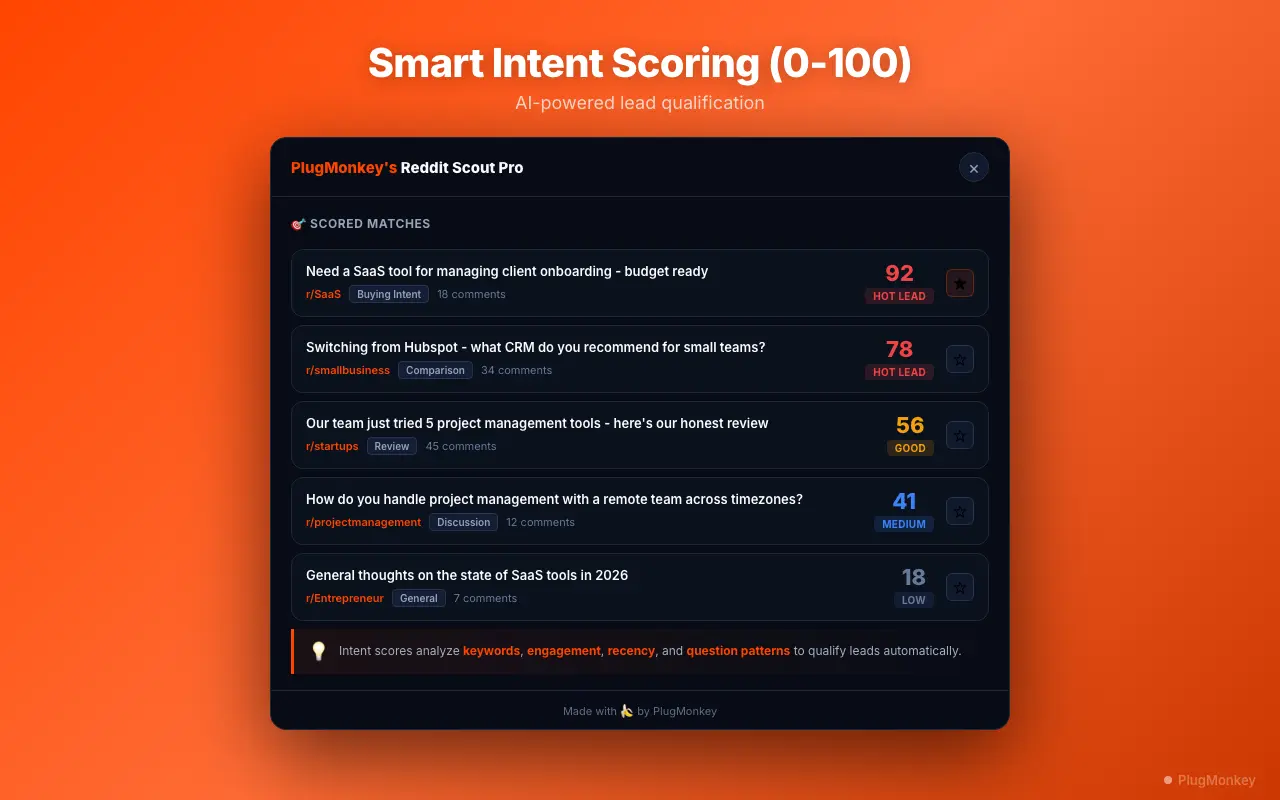
- Free tier: 3 keywords with basic intent buckets. Pro tier: unlimited keywords, 0–100 intent scoring, subreddit targeting, and CSV export.
By PlugMonkey Team, Editorial
Step 1: Install and Open Scout Pro for Reddit
Install Scout Pro for Reddit from the Chrome Web Store. Click the extension icon in your Chrome toolbar to open the configuration panel. On first launch, you will see the keyword setup wizard that guides you through the initial configuration.
Step 2: Configure Your Keywords
Enter the keywords and phrases you want to monitor. Be strategic about your keyword selection — too broad and you will get noise, too narrow and you will miss relevant conversations.
- Brand keywords — Your company name, product name, and common misspellings (e.g., "plugmonkey", "plug monkey", "PlugMonkey")
- Competitor keywords — Names of competing products to track market conversations and positioning opportunities
- Problem keywords — Phrases describing problems your product solves (e.g., "need a tool to monitor Reddit", "Reddit listening tool")
- Buyer intent phrases — Questions and comparison queries that indicate purchase intent (e.g., "best Reddit monitoring tool", "which Reddit tracker")
- Phrase matching — Use quotes for exact phrases ("reddit monitoring") or leave unquoted for individual keyword matching
Step 3: Target Subreddits (Optional)
By default, Scout Pro for Reddit monitors across all of Reddit. For more focused results, you can target specific subreddits where your audience is most active. Enter subreddit names in the subreddit filter field. For example, if you sell a SaaS product, you might target r/SaaS, r/startups, r/Entrepreneur, and r/smallbusiness. See subreddit filtering for advanced targeting strategies.
- All of Reddit (default) — Broadest coverage, catches mentions everywhere but may include irrelevant results
- Targeted subreddits — More focused results from communities where your audience participates
- Exclude subreddits — Block specific subreddits that generate noise (e.g., meme subreddits where your brand name has a different meaning)
- Combine approaches — Monitor brand keywords across all of Reddit, but restrict problem keywords to industry-specific subreddits
Step 4: Configure Alert Preferences
Customize how and when you receive notifications about new keyword matches.
- Browser notifications — Get a Chrome notification when a new high-intent mention is detected. Configurable by intent category and score threshold.
- Badge count — The extension icon shows an unread count of new mentions since your last check
- Intent filter — Only get notified for specific intent categories (e.g., only "Solution Request" and "Recommendation" mentions, not "General Mention")
- Minimum intent score — Set a threshold (e.g., 60+) to only be alerted about higher-intent conversations
- Scan frequency — Configure how often the background scan runs (every 15 minutes, 30 minutes, 1 hour, etc.)
Free vs Pro Alert Capabilities
The free tier lets you monitor up to 3 keywords with basic intent categorization and browser badge notifications. The Pro tier unlocks unlimited keywords, full buyer intent scoring (0-100), advanced filtering, subreddit targeting, and CSV export of mentions. For most evaluation purposes, 3 keywords covering your brand name, a competitor, and one problem keyword gives you a solid taste of what Scout Pro for Reddit can do. See how keyword monitoring works for the full technical breakdown.
Want a Second Opinion?
Ask AI for an independent perspective on this question.
AI responses are generated independently and may vary
Sources & Further Reading
- Reddit Content Policy — official platform rules that should inform how you engage with surfaced mentions — Reddit, Inc. (accessed May 22, 2026)
Try Scout Pro for Reddit Free
Set up your first Reddit keyword alerts in 3 minutes. 3 keywords free, no credit card required.
4.8/5 (0 reviews)3,120 users