FAQ
How to Export Your Instagram Followers List to CSV
Quick Answer
Instagram's native data download gives you a plain list of follower usernames with no profile data. Followers Exporter Pro for Instagram fills the gap. Install the extension, open instagram.com on desktop, navigate to any public profile, click the Followers or Following count to open the modal, then hit Start Scan in the extension panel. When the scan finishes, click Export CSV — open it in Excel, Sheets, or Numbers.
- Instagram's built-in 'Download Your Information' export gives you usernames only — no bio, follower count, post count, or verified status.
- Followers Exporter Pro for Instagram adds those fields by reading your own logged-in browser session — no password sharing, no OAuth, no Graph API token.
- Steps: install, navigate to a profile on desktop, open the Followers or Following modal, click Start Scan, then Export CSV.
- Works on any public profile (yours or someone else's). Free tier: 100 followers per scan. Pro tier: unlimited.
By PlugMonkey Team, Editorial
Why Export Instagram Followers?
There are many legitimate reasons to export an Instagram follower list. Marketers use it for audience analysis and segmentation. Businesses use it for lead generation and CRM enrichment. Influencers use it to understand their audience demographics. Researchers use it for social media studies. Instagram's native data download (available through Settings) only provides a list of usernames with no additional data — not useful for analysis or outreach.
Step 1: Install the Extension
Install Followers Exporter Pro for Instagram from the Chrome Web Store. Click "Add to Chrome" and confirm the installation. The extension requires access only to the instagram.com domain — it cannot read data from any other website. No Instagram API access or OAuth tokens are needed.
Step 2: Navigate to a Profile
Go to Instagram.com in your Chrome browser (not the mobile app — the extension works in the desktop browser). Navigate to any public profile, or your own profile. Click on the Followers or Following count to open the list. This opens the follower modal that the extension will scan.
Step 3: Start the Scan
Click the Followers Exporter Pro for Instagram icon in your browser toolbar to open the extension panel. You will see a Start Scan button. Click it, and the extension begins scrolling through the follower list in the background, collecting profile data for each account. A progress indicator shows how many profiles have been scanned. For accounts with thousands of followers, the scan may take several minutes — the extension paces itself to avoid triggering Instagram's rate limits.
Step 4: Export to CSV
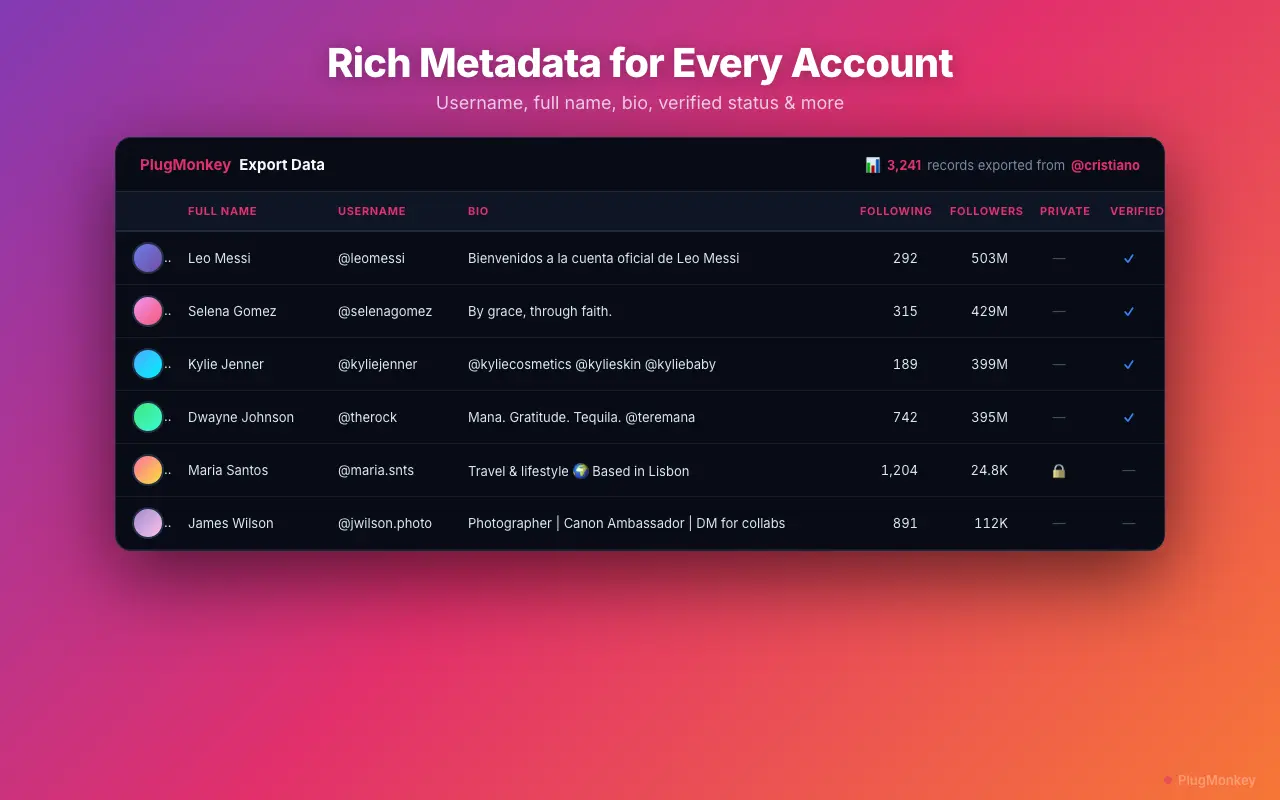
Once the scan completes (or at any time during the scan if you want a partial export), click the Export CSV button. A .csv file downloads to your default download location. Open it with Excel, Google Sheets, Numbers, or any spreadsheet application.
What Data Is Included in the Export
Followers Exporter Pro for Instagram captures multiple data fields for each follower. The exact fields available depend on what Instagram exposes in the follower list view.
- Username — The @handle (e.g., @plugmonkey)
- Full name — The display name shown on the profile
- Bio — The profile biography text
- Follower count — Number of followers the account has
- Following count — Number of accounts they follow
- Post count — Total number of posts published
- Profile picture URL — Direct link to their profile image
- Verified status — Whether the account has a verification badge
- Is private — Whether the account is set to private
- Profile URL — Direct link to the Instagram profile
Common Use Cases
Here are the most popular ways people use exported Instagram follower data.
- Audience analysis — Understand who follows an account by analyzing bios, follower counts, and engagement patterns
- Lead generation — Export competitor followers to find potential customers interested in your niche
- Influencer marketing — Analyze an influencer's follower quality before partnering (look for bots, fake accounts, follower-to-following ratios)
- CRM enrichment — Import follower data into your CRM to connect social profiles with existing contacts
- Content strategy — Study what types of accounts follow you to inform your content direction
- Competitive intelligence — Compare follower overlap between your account and competitors to find unique audience segments
Free Tier Limits
The free tier of Followers Exporter Pro for Instagram allows you to scan and export up to 100 followers per scan. This is enough to evaluate the data quality and test your workflow. The Pro tier removes all limits, supporting complete exports regardless of follower count. Pro pricing: $6.99/month, $29.99/year, or $49.99 lifetime.
Want a Second Opinion?
Ask AI for an independent perspective on this question.
AI responses are generated independently and may vary
Continue Reading
Sources & Further Reading
- Downloading your data on Instagram — official native export feature (usernames only, no enriched profile fields) — Meta / Instagram Help Center (accessed May 22, 2026)
Try Followers Exporter Pro for Instagram Free
Export your first 100 Instagram followers free. See the full data quality before upgrading to unlimited exports.
4.9/5 (12 reviews)6,890 users