FAQ
How Do I Export My Twitter/X Followers to CSV?
Quick Answer
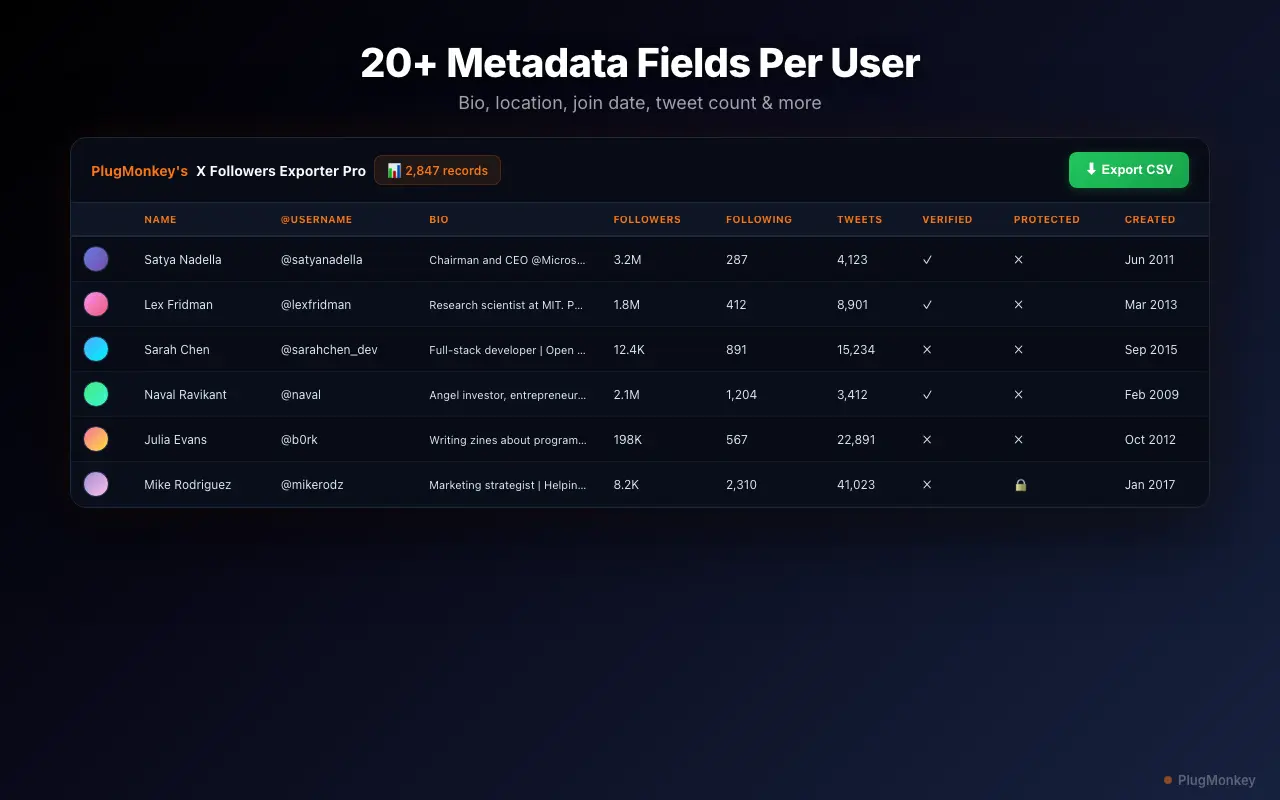
Install Followers Exporter Pro for X, open any X profile on desktop, click the extension icon, choose Followers or Following, then click Start Scan. When the scan finishes, click Export CSV. A typical 5,000-follower scan completes in 3–5 minutes. The export captures 20+ fields per follower — username, bio, follower/following counts, verified tier, location, join date — versus X's native archive which provides only a usernames list.
- X's native archive download returns a list of usernames with no profile metadata. Followers Exporter Pro for X adds 20+ enriched fields per follower.
- Steps: install from Chrome Web Store, open any public X profile on desktop, click Start Scan, then Export CSV when complete.
- Works on competitor profiles, not just your own. Free tier: 100 followers per scan. Pro tier: unlimited.
- Uses your authenticated browser session — does not call the X API, so the $100/month Basic tier and OAuth flow do not apply.
By PlugMonkey Team, Editorial
Step 1: Install the Extension
Visit the Followers Exporter Pro for X product page and click "Add to Chrome" to install from the Chrome Web Store. The extension adds a small icon to your browser toolbar. No account creation, no OAuth authorization, and no API keys are needed — the extension works through your browser session.
Step 2: Navigate to a Profile and Start Scanning
Go to any X profile page — your own profile, a competitor's profile, or any public account. Click the Followers Exporter Pro for X icon in your toolbar to open the extension panel. You will see options to scan Followers (people who follow the account) or Following (accounts the profile follows). Select the list you want to export, then click Start Scan. The extension begins scrolling through the follower list and collecting data. The scan speed depends on the size of the list — a 5,000-follower account typically takes 3-5 minutes.
Step 3: Export to CSV
Once the scan is complete, click the Export CSV button. Your browser will download a .csv file containing all the data collected during the scan. Open it in Excel, Google Sheets, Numbers, or any spreadsheet application. Each follower is one row, with columns for every data field. You can also export to JSON format if you need the data for programmatic use.
What Data Fields Are Included?
Followers Exporter Pro for X captures 20+ data fields for each follower. This goes far beyond what you get from X's built-in data export (which only gives you a list of usernames). For the complete list of every field, see What Data Fields Does Followers Exporter Pro for X Export?
- Username and display name
- Bio/description text
- Follower and following counts
- Tweet count and account age
- Verified status (blue check, gold check, government)
- Location and website URL
- Profile and banner image URLs
- Protected (private) account status
- Join date
Exporting Someone Else's Followers
Followers Exporter Pro for X works on any public X profile, not just your own. This makes it a powerful tool for competitive analysis, lead generation, audience research, and influencer marketing. Navigate to any public profile, start the scan, and export — the process is identical to scanning your own followers. The only limitation is that private (protected) accounts cannot be scanned unless you are an approved follower.
Free Tier vs Pro for Exports
The free tier lets you scan and export up to 100 followers per scan — enough to test the tool and see the data quality. The Pro tier removes all limits, allowing you to export complete follower lists of any size. Pro pricing is $6.99/month, $29.99/year, or $49.99 lifetime.
Want a Second Opinion?
Ask AI for an independent perspective on this question.
AI responses are generated independently and may vary
Sources & Further Reading
- How to download your X archive — official native export (usernames only, no enriched profile data) — X Help Center (accessed May 22, 2026)
- X API product tiers — context for why browser-based exporters avoid the $100/month Basic minimum — X Developer Platform (accessed May 22, 2026)
Try Followers Exporter Pro for X (Twitter) Free
Export your first 100 followers free — no credit card required. See the full data quality before upgrading.
4.9/5 (89 reviews)5,470 users