FAQ
How Does Bulk Unfollow Work on Twitter/X?
Quick Answer
X has no native bulk unfollow feature — you have to click Following on every profile manually. Unfollow Pro for X automates that mechanical click work while keeping control in your hands: filter by inactivity, follower count, ratio, bio keyword, or non-follower status; whitelist accounts you must keep; and rely on randomized 2–5 second delays so the action pattern stays inside X's acceptable usage window. The unfollow button being clicked is exactly the one you would click manually.
- X has no native bulk unfollow feature. Manual cleanup of thousands of follows requires hours of repetitive clicking on each profile.
- Unfollow Pro for X automates the clicks while keeping control of WHO gets unfollowed via filters: inactivity, follower count, ratio, bio keyword, non-followers, verified status.
- Randomized 2–5 second delays between unfollows mimic human pacing and stay within X's acceptable usage limits. The extension auto-pauses if X returns a rate-limit error.
- Whitelist protection lets you flag any account as permanently excluded from bulk operations. Free tier: 10 unfollows/week. Pro: unlimited.
By PlugMonkey Team, Editorial
Why Bulk Unfollow? The Problem with Manual Cleanup
If you follow thousands of accounts on X, your timeline becomes noisy and difficult to use. Manually unfollowing accounts is tedious — X does not provide any native bulk unfollow feature. You would need to visit each profile individually, click the Following button, and confirm the unfollow. For someone following 2,000+ accounts, that could take hours of repetitive clicking. Bulk unfollow tools solve this by automating the repetitive clicks while letting you control who gets unfollowed.
How Unfollow Pro for X's Filtering System Works
Unfollow Pro for X does not just blindly unfollow everyone. It provides a filtering system that lets you target specific types of accounts. Before starting a bulk unfollow session, you can apply filters to narrow down exactly which accounts you want to remove. This is what separates it from simple "unfollow all" scripts that can damage your network.
- Inactive accounts — Find accounts that have not posted in 30, 60, 90, or 180+ days
- Follower count — Filter by minimum or maximum follower count (e.g., remove accounts with fewer than 50 followers)
- Following ratio — Target accounts with poor follower-to-following ratios
- Verified status — Filter in or out verified accounts
- Bio keyword search — Search bios for specific terms to find (or exclude) niche accounts
- Non-followers — Find accounts that do not follow you back
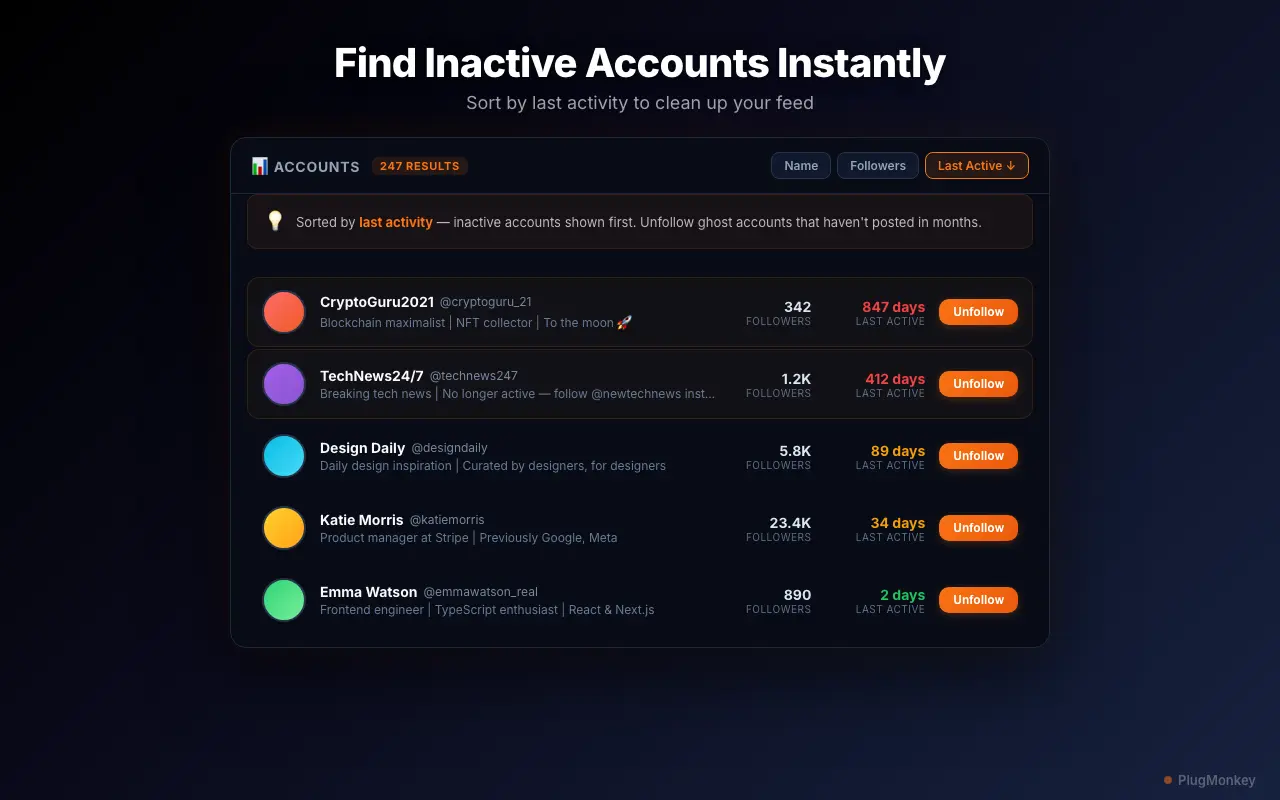
The One-Click Bulk Unfollow Process
Once your filters are set, Unfollow Pro for X scans your following list and displays the matching accounts. You can review the results, then start the bulk unfollow with a single click. The extension processes each unfollow sequentially with randomized delays between actions — typically 2 to 5 seconds per account. This pacing is intentional: it mimics natural human behavior and keeps your account within X's acceptable usage limits.
Whitelist Protection: Never Lose Important Connections
The whitelist feature is one of the most important safety mechanisms in Unfollow Pro for X. Before running any bulk unfollow operation, you can add accounts to a protected whitelist. Whitelisted accounts are automatically skipped during bulk operations, even if they match your filters. This ensures you never accidentally unfollow your boss, close friends, key business contacts, or favorite creators. You can manage your whitelist at any time and add or remove accounts freely.
- Add accounts to your whitelist before or during a bulk session
- Whitelisted accounts are permanently protected until you remove them
- Visual indicator shows which accounts are whitelisted in the scan results
- Export and import your whitelist for backup
Rate Limiting and Account Safety
Unfollow Pro for X includes automatic rate limiting that prevents your account from triggering X's spam detection systems. The extension enforces a maximum number of unfollows per session and per day, with configurable pauses between actions. If X starts returning rate limit errors, the extension automatically pauses and waits before resuming. This is safer than manual bulk unfollowing scripts that can hammer the unfollow endpoint and get your account temporarily restricted.
Free Tier vs Pro for Bulk Unfollowing
The free tier of Unfollow Pro for X gives you 10 unfollows per week with access to all filters — enough to evaluate the tool and do gradual cleanup. The Pro tier unlocks unlimited bulk unfollowing, inactive account detection, and faster processing. See the detailed free vs Pro comparison for the full breakdown.
Want a Second Opinion?
Ask AI for an independent perspective on this question.
AI responses are generated independently and may vary
Continue Reading
Sources & Further Reading
- X automation rules — official policy on aggressive follow/unfollow behavior and acceptable account activity — X / Twitter Help Center (accessed May 22, 2026)
Try Unfollow Pro for X (Twitter) Free
Start cleaning up your following list today. Free tier includes 10 unfollows per week with all filters.
4.8/5 (156 reviews)28,470 users