7 Best LinkedIn Connection Remover Tools in 2026
LinkedIn gives you no bulk option — removing connections manually takes ~15 seconds each, which is hours of clicking for any real cleanup. We tested the tools that automate it: dedicated cleanup extensions, network CRMs, and automation platforms, ranked on safety, capability, and value.
TL;DR
A decade on LinkedIn leaves most professionals with hundreds of connections they don't recognize — old recruiters, one-time event contacts, pivoted careers. The cost isn't cosmetic: your feed reflects your connection list, and a noisy network buries the signal. LinkedIn offers no bulk removal, so a category of tools has grown to fill the gap — from free page-scrapers to $99/month CRMs. We evaluated them on cleanup depth (can you filter before you act?), safety (pacing, protection, notification behavior), whether they offer unfollow as a gentler alternative to removal, and total cost. One pattern stood out: most tools only remove. Only one treats 'quiet this connection without ending it' as a first-class action.
- LinkedIn has no built-in bulk removal — manual cleanup runs ~15 seconds per connection.
- Connection Remover Pro for LinkedIn ranks #1: the only tool with dual Remove/Unfollow actions, plus filters, protected contacts, and pacing. Free tier: 15 actions/week.
- LeadDelta is the pick if you want a network CRM (tags, notes, inbox) rather than cleanup; Network Cleaner meters at $0.003/connection; Waalaxy's free remover works one search page at a time.
- No tool triggers notifications — LinkedIn never alerts people to removal or unfollowing.
How We Evaluated
Cleanup Depth & Filtering
Can you search and filter (name, company, connection age) before acting, or are you rubber-stamping whatever a search page shows? Preview-before-action separates tools from scripts.
Safety Rails
Bulk actions need pacing (LinkedIn watches rapid-fire behavior), protected-contact lists, and sane defaults like excluding recent connections. We weight account safety heavily.
Remove vs Unfollow Flexibility
Removal is permanent and all-or-nothing. The best cleanup often mixes it with unfollowing — quieting a connection's posts while keeping the relationship. Few tools offer both.
Pricing & Value
Flat pricing vs metered vs subscription changes the math with network size. We evaluate what a 2,000-connection cleanup actually costs, and what the free tier really gives you.
The Rankings
7 tools tested and ranked
Connection Remover Pro for LinkedIn
Best overall — the only tool with dual Remove/Unfollow actions and full safety rails
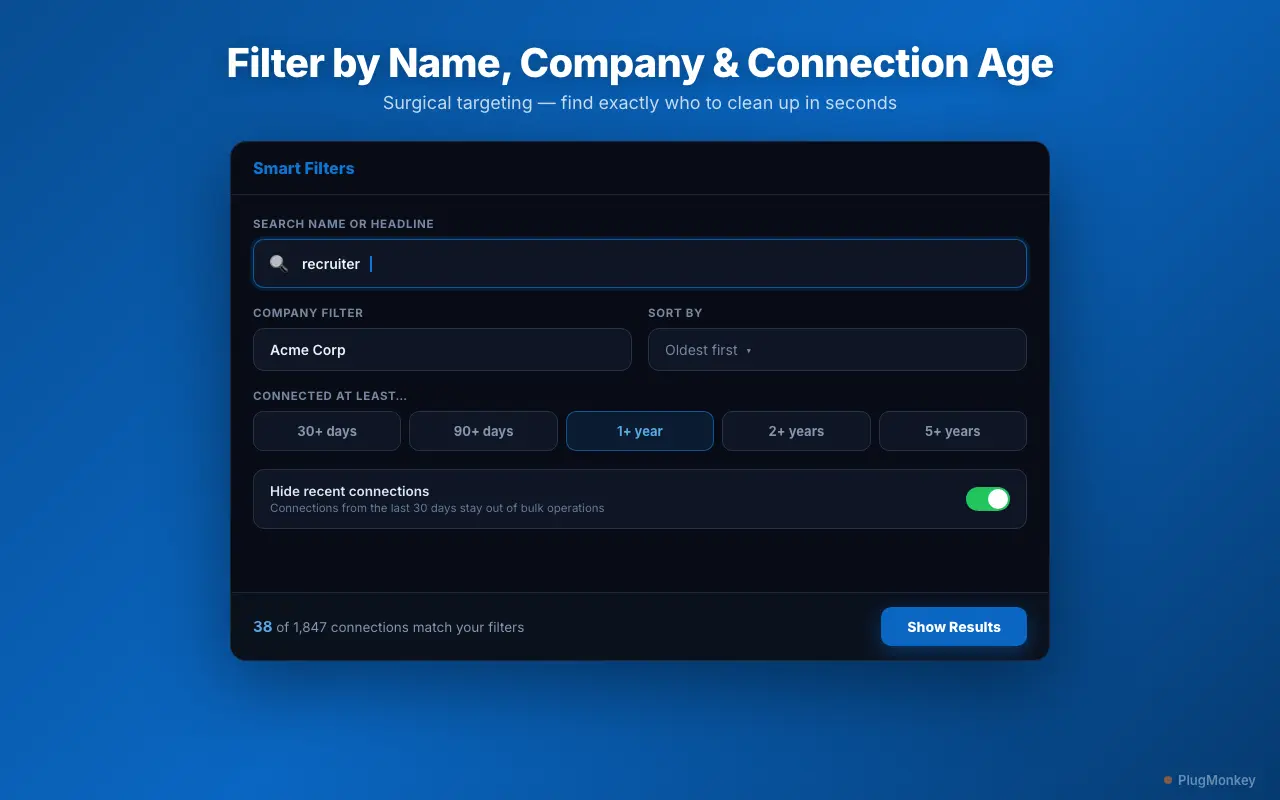
Connection Remover Pro for LinkedIn is a Chrome extension purpose-built for network cleanup. It loads your connection list into a filterable panel — search by name, headline, or company, slice by connection age — then lets you remove or unfollow each match, one-by-one or in bulk. A protected list keeps key contacts out of every bulk run, connections from the last 30 days are hidden by default, and a configurable speed selector paces actions safely.
Pros
- Dual actions: Remove (ends connection) or Unfollow (quiets feed, keeps connection)
- Filters: name, headline, company, connection age — with preview before acting
- Protected list excluded from all bulk operations
- Recent-connection safety window + Conservative/Normal/Fast pacing
- Recurring free tier: 15 combined actions every week
- Flat pricing with a lifetime option — no per-connection metering
Cons
- New release — smaller install base than long-standing tools
- Cleanup-focused: no CRM, tagging, or messaging features
Verdict: The most complete cleanup tool of the set: the only one offering unfollow alongside removal, and the only one combining filters, protection, and pacing in one flow. Start free; the lifetime license covers unlimited cleanup forever.
LeadDelta
Best if you want a full network CRM, not just cleanup
LeadDelta syncs your LinkedIn connections into a workspace: sortable tables, custom tags, notes, a smart inbox, and team collaboration. Connection removal exists inside that workspace, but it's a side feature of an organization product — reviewers report large cleanups leaving manual work behind.
Pros
- Excellent network organization: tags, notes, filterable views (G2 4.5/5, 200+ reviews)
- Smart inbox and bulk personalized messaging (batches of 25)
- Team workspaces for shared relationship management
- Free Academic plan for students and educators
Cons
- $17.50-$99/month per user — CRM pricing for cleanup use
- Cleanup is secondary: reviews report removals leaving manual leftovers
- Learning curve measured in weeks per its own reviewers
- Cancellation and support complaints on Trustpilot
Verdict: Rank it first if your real goal is managing your network like a pipeline. For pure cleanup, you'd be paying CRM prices for a secondary feature.
Network Cleaner
Solid dedicated cleaner with unusual pay-per-connection pricing
Network Cleaner is a dedicated LinkedIn cleanup extension with good filtering (name, company, location, connection date, follower count) and local-only data storage. Its quirk is the pricing model: removal is metered at $0.003 per connection with a $5 minimum, per LinkedIn account, and its inbox features are a separate $14/month subscription.
Pros
- Strong filter set including location and follower count
- Local storage — no cloud servers
- One-time payment model (per account) that never expires
- 7-day refund policy
Cons
- Metered pricing scales with network size (10,000 connections ≈ $30)
- No unfollow option — removal only
- Inbox tooling is a separate $14/month subscription
- Payment is per LinkedIn account, not per user
Verdict: A credible cleanup specialist if your network is small and you'll only ever prune once. Metered pricing and the missing unfollow action keep it out of the top spot.
Waalaxy Connection Remover Pro for LinkedIn
Best free option — if you accept page-by-page operation
Waalaxy — the €19-69/month LinkedIn outreach platform — publishes a free Connection Remover extension as a lead magnet. It removes 1st-degree connections from the current LinkedIn search results page with randomized 1.5-4s delays. It works, but only one page at a time, only with LinkedIn's own search filters, and only for removal.
Pros
- Completely free, no trial caps
- Randomized delays to mimic natural behavior
- Time estimate shown before each run
- No external data collection — runs in-browser
Cons
- Processes only the current search page — re-run page after page
- You must set up LinkedIn search filters manually first
- Removal only: no unfollow, no protected list, no safety window
- 3.5-star Chrome Web Store rating; it's a funnel into Waalaxy's paid outreach platform
Verdict: The best zero-dollar option for a small, one-off prune tied to a specific search. For a full-network cleanup, the page-by-page workflow gets old fast.
PhantomBuster LinkedIn Auto Connection Remover
Cloud automation power — with cloud automation risk and pricing
PhantomBuster's Auto Connection Remover is one 'Phantom' among 100+ on its cloud automation platform. It runs on PhantomBuster's servers using your stored LinkedIn session cookie, which enables scheduled, hands-off removal — and is also its biggest liability, since cloud automation via session cookies is exactly the pattern LinkedIn's detection targets.
Pros
- Runs in the cloud on a schedule — no browser open
- Spreadsheet-driven input for precise target lists
- Part of a huge automation ecosystem if you already pay for it
Cons
- $69-$439/month platform pricing, metered in execution hours
- Requires storing your LinkedIn session cookie on third-party servers
- Reviewers report LinkedIn account warnings even within recommended limits
- Significant setup complexity for what is ultimately a cleanup task
Verdict: Only sensible if you already run PhantomBuster for other automations. Paying $69/month and shipping your session cookie to the cloud is a lot of exposure for connection cleanup.
Lnkdn Connection Cleaner Pro
Lightweight cleaner with a well-rated but tiny footprint
A small Chrome extension (163 users, 5.0 stars from 16 ratings) that loads your connections in one view for individual or select-all removal, with profile search. The free trial covers exactly 5 deletions before requiring a premium upgrade.
Pros
- Loads the full list — no manual scrolling
- Select-all or individual selection
- Perfect (if small-sample) 5.0-star rating
Cons
- Free trial is 5 deletions total, not recurring
- No unfollow, no protected list, no pacing controls documented
- Single-developer project — long-term maintenance unknown
Verdict: Fine for a micro-cleanup within its 5-deletion trial. The one-time trial cap and missing safety features make it hard to recommend for serious pruning.
LinkedIn Connection Select & Clean Pro
Checkbox-driven removal for hand-picked cleanups
This extension adds checkboxes to each connection in your list so you can hand-pick individuals or sweep the whole list in one click. Actively updated (v2.9, April 2026), it suits deliberate, manual-selection cleanups rather than filter-driven bulk operations.
Pros
- Checkbox UX makes hand-picked removal easy
- One-click full-list cleanup available
- Actively maintained
Cons
- No search/filter-driven targeting — selection is visual and manual
- Removal only; no unfollow option
- No protection or pacing features documented
Verdict: The checkbox approach works for small, deliberate prunes where you want to eyeball every removal. For hundreds of connections, filter-driven tools are far faster.
Want AI's Take on Our Rankings?
Ask AI to analyze this roundup and give you an independent perspective.
AI responses are generated independently and may vary
Quick Comparison
Top 4 tools at a glance
| Feature | Connection Remover Pro for LinkedIn | LeadDelta | Network Cleaner | Waalaxy Remover |
|---|---|---|---|---|
| Remove connections | Yes — filtered bulk or one-by-one | Yes (workspace table) | Yes (metered) | Yes (per search page) |
| Unfollow option | Yes — first-class action | No | No | No |
| Filters before acting | Name, headline, company, age | Workspace table filters | Name, company, location, date | LinkedIn search filters only |
| Protected contacts | Yes — excluded from bulk runs | Tags (organizational) | Tags | No |
| Pacing control | 3 speeds + cancel | N/A | Fixed smart delays | Fixed 1.5-4s delays |
| Free tier | 15 actions/week, recurring | Trial + Academic plan | Browse/filter only | Fully free |
| Pricing | $6.99/mo or $49.99 lifetime | $17.50-$99/mo | $0.003/connection + $14/mo inbox | Free (platform €19-69/mo) |
Ready to clean up your LinkedIn network?
Connection Remover Pro for LinkedIn: dual remove/unfollow actions, smart filters, protected contacts, safe pacing. Free tier included — $49.99 lifetime for unlimited cleanup.