The TwFollow Alternative With 20 Data Fields Per Profile
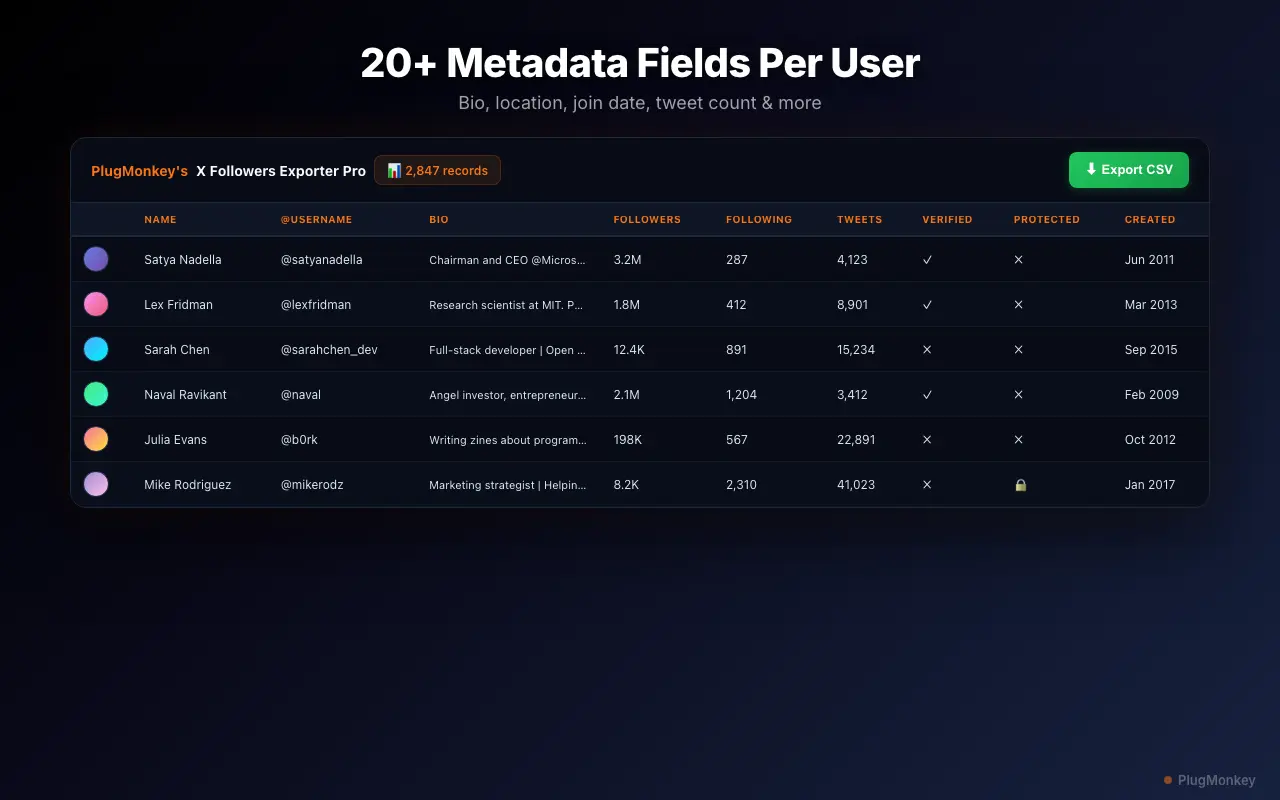
TwFollow exports basic follower data — username, bio, and follower counts. Followers Exporter Pro for X captures 20 fields including join date, verified status, location, website, tweet count, and more. Same browser-based approach, far richer data.
 By Zee Calder
TL;DR
TwFollow is a Chrome extension that exports Twitter/X followers and following lists to CSV. It's functional for basic exports but limited in the data it captures. Followers Exporter Pro for X exports 20 data points per profile — including join date, verified status, location, website URL, tweet count, and favourites and media counts. Both run in your browser for privacy, but Followers Exporter Pro for X gives you the rich data you need for lead qualification, audience analysis, and sales prospecting. $6.99/month or $49.99 lifetime.
Why TwFollow Users Look for Alternatives
Limited data fields per export
TwFollow captures basic profile information — username, bio, follower/following counts. For lead generation or audience research, you need richer data: join date, verified status, location, website URLs, tweet count. TwFollow doesn't provide this depth.
Free tier restrictions limit practical use
TwFollow's free version has limitations on export size and features. For users who need to export large follower lists regularly, the free tier is too restrictive to be useful for professional workflows.
No advanced filtering or sorting
TwFollow exports raw lists without pre-export filtering. You can't filter by verified status, location, or activity level before exporting — you have to export everything and clean the data manually in a spreadsheet.
Basic CSV output needs manual cleanup
The exported CSV from TwFollow requires significant manual work to be useful for sales pipelines or CRM imports. Missing fields mean you're spending time on data enrichment that a better tool would capture upfront.
Followers Exporter Pro for X vs TwFollow
Feature-by-feature comparison
| Feature | TwFollow | Followers Exporter Pro for X |
|---|---|---|
| Data fields per profile | Basic (username, bio, counts) | 20 fields (join date, verified, location, website, etc.) |
| Verified status export | Not included | Yes — filter and export verified accounts |
| Location data | Not included | Yes — geographic data when available |
| Website/URL export | Not included | Yes — profile website URLs |
| Pre-export filtering | No — export all, filter later | Yes — filter before export |
| Export format | CSV | CSV with full metadata |
| Privacy (local processing) | Yes — runs in browser | Yes — runs in browser |
| Rate limit handling | Multi-account bypass, auto-retry | Built-in rate limit management |
| Monthly cost | Freemium (premium pricing varies) | $6.99/month |
| Lifetime option | Not available | $49.99 one-time payment |
Pricing: Followers Exporter Pro for X (Twitter) vs TwFollow
TwFollow
TwFollow offers a free tier with limitations and a premium subscription for full features. Exact premium pricing varies.
- Subscription-only pricing
- Lose access when you cancel
Followers Exporter Pro for X (Twitter)
Followers Exporter Pro for X at $49.99 lifetime gives you 20 data fields and no weekly export limit on Pro — with no ongoing subscription.
30-day refund if it doesn't work as described
Still Deciding?
Get an independent AI perspective on which tool is the better fit for you.
AI responses are generated independently and may vary
Is Followers Exporter Pro for X (Twitter) Right for You?
Switch If You...
- You need more than basic username and bio data from your Twitter exports
- You want verified status, location, website URLs, and join dates in your exports
- You need to filter followers before exporting instead of cleaning data manually afterward
- You want a one-time lifetime purchase instead of a recurring subscription
- You're doing lead generation and need rich data for qualification
- You want CRM-ready exports without manual data enrichment
Consider Other Options If You...
- You only need basic follower/following lists with usernames and counts
- You manage multiple X accounts and need multi-account rate limit bypass — TwFollow supports this
20 data fields. Pre-export filtering. One-time purchase.
Followers Exporter Pro for X: rich profile data, CRM-ready exports, $49.99 lifetime. No subscription.